
User flow chart
There are two routes into BioF:GREAT. Straightforward analytical work is handled as a service request and needs no proposal. Larger or more open-ended work goes through a user proposal, which is reviewed and may carry funding. Both routes begin with a conversation.
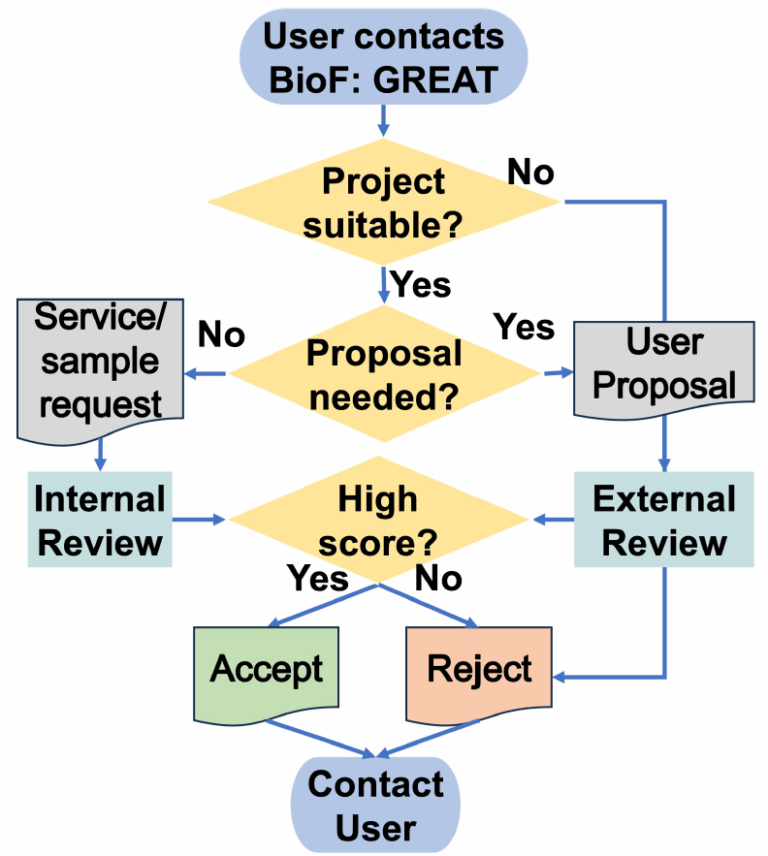
Route 1 — Service request
For defined glycoanalytic work: glycomics profiling, glycoproteomics, monosaccharide composition, linkage analysis, and the other services listed under glycoanalytics.
- Contact BioF:GREAT through the contact page describing the analysis you need.
- Suitability confirmed. If the request fits the service catalogue, no proposal is required.
- Submit through the portal. Complete the service request form.
- Work with a technician. An assigned technician from the Glycoanalytics User Facility runs the analysis and returns the data.
Route 2 — User proposal
For larger projects: method development, extended sample series, collaborative research and work that may require allocated funding.
- Contact BioF:GREAT through the contact page to discuss the project.
- Initial consultation. A virtual consultation establishes scope and feasibility.
- Submit a proposal. A short 1–2 page user proposal; the BioF:GREAT team will help you write it.
- Internal and external review. All proposals are reviewed by BioF:GREAT’s internal and external reviewers.
- Approval and funding. If approved, the project proceeds and funding is allocated where applicable.
Not sure which route applies? Start with a service request.
A service request can be upgraded to a user proposal at any point if the work grows beyond
routine analysis. Questions can go to any BioF:GREAT PI or co-PI, or through the
contact page.